
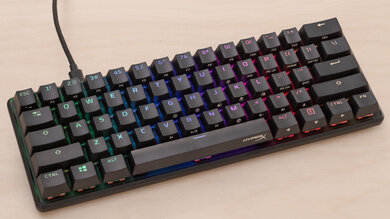
Top Affordable Mechanical Keyboards for Every Budget
Finding a mechanical keyboard that’s both affordable and high-performing can feel like searching for a needle in a haystack. With so many options flooding the market, it’s easy to get overwhelmed by flashy designs, multiple switch types, and extra features that may or may not matter. Whether you’re a gamer, a writer, or someone who spends hours typing every day, the right budget mechanical keyboard can dramatically improve your experience without draining your wallet.
In my own setup, switching from a basic membrane keyboard to a budget mechanical one transformed my typing speed and comfort overnight—proving that affordability doesn’t mean compromise.
Why Choose a Budget Mechanical Keyboard?
Mechanical keyboards are loved for their tactile feedback, durability, and satisfying keystroke experience. While premium models can cost a small fortune, budget options now offer almost all the perks without the hefty price tag.
Key benefits include:
- Durability: Most mechanical switches can last 50 million keystrokes or more.
- Typing Comfort: Improved tactile or clicky feedback reduces finger fatigue.
- Customization: Some budget models still offer RGB lighting, programmable keys, and hot-swappable switches.
Choosing the right keyboard often depends on what you prioritize—gaming performance, typing comfort, or portability.
Features to Look For
When hunting for the best budget mechanical keyboards, consider these features:
- Switch Type
Mechanical switches generally fall into three categories: tactile, clicky, and linear. Tactile switches provide a noticeable bump, clicky switches offer audible feedback, and linear switches feel smooth without bumps or clicks. Your choice impacts typing feel and noise levels. - Build Quality
Look for keyboards with sturdy frames, often made from ABS or PBT plastic. A metal backplate, though rare in budget models, adds extra rigidity. - Connectivity
Most budget mechanical keyboards are wired, but some wireless options exist. Wired connections are ideal for gaming due to lower latency. - Key Rollover and Anti-Ghosting
If you game seriously, N-key rollover and anti-ghosting ensure every keypress is registered, even when multiple keys are pressed simultaneously.
Top Budget Mechanical Keyboards (Comparison Table)
| Keyboard Model | Switch Type | Key Rollover | Backlighting | Price Range |
|---|---|---|---|---|
| Redragon K552 | Outemu Blue | 87-key NKRO | Red LED | $35–$40 |
| Cooler Master CK530 | Gateron Red | Full NKRO | RGB | $60–$70 |
| Tecware Phantom | Outemu Brown | Full NKRO | RGB | $50–$60 |
| Ajazz AK33 | Outemu Blue | 82-key NKRO | RGB | $40–$50 |
This table highlights options that balance performance, aesthetics, and affordability. Each has a slightly different feel, so trying them in person or reading user reviews can help you make the best choice.
Typing, Gaming, and Productivity
Imagine a student who needs a durable keyboard for both late-night assignments and casual gaming sessions. A budget mechanical keyboard like the Redragon K552 can handle rapid typing for essays while offering a satisfying tactile response for gaming marathons. The student enjoys long study sessions without finger fatigue, proving that a high-end experience doesn’t always require high-end spending.
Unique Value
Beyond cost and basic functionality, many budget mechanical keyboards now offer features traditionally reserved for premium models. For instance, some include hot-swappable switches, meaning you can replace or upgrade switches without soldering. Others provide detachable cables, modular keycaps, or compact layouts suitable for small desks. This makes these keyboards versatile tools for work, gaming, or casual use—combining convenience, durability, and style in a surprisingly accessible package.
Tips for Choosing the Right Model
- Test the switches if possible: A tactile switch might feel perfect for typing but too noisy for shared spaces.
- Check keycap material: PBT keycaps resist wear better than ABS.
- Consider size: Tenkeyless models save desk space, while full-size boards are better for spreadsheets and numeric entry.
- Look for warranty: Even budget keyboards can fail; a reliable warranty adds peace of mind.
Read More: Best Smart Home Hubs for Seamless Automation
Conclusion
Budget mechanical keyboards have come a long way. Today, you don’t need to spend a fortune to get excellent build quality, satisfying feedback, and even aesthetic flair. Whether you’re typing up reports, coding for hours, or enjoying a gaming session, there’s a budget-friendly mechanical keyboard that can enhance your experience significantly. Investing in the right model saves money in the long run while boosting productivity, comfort, and enjoyment.
FAQs
Q1: Are budget mechanical keyboards worth it?
Yes. Many budget models now offer high durability, good typing feedback, and even RGB lighting, making them a solid choice for both work and gaming.
Q2: What switch type is best for beginners?
Tactile or linear switches are recommended. Tactile switches give feedback without excessive noise, while linear switches are smooth and quiet.
Q3: Can I use a budget mechanical keyboard for gaming?
Absolutely. Many budget models support N-key rollover and anti-ghosting, essential for gaming performance.
Q4: How long do budget mechanical keyboards last?
Most switches in these keyboards can endure 50 million keystrokes, often translating to 5–10 years of regular use.
Q5: Are smaller layouts better than full-size keyboards?
It depends on your needs. Tenkeyless or compact layouts save desk space, while full-size boards are better for data entry and spreadsheets.





One Comment